
建置「Zabbix Server」需要知道幾樣關鍵,由於「Zabbix」 是基於「PHP」及「MySQL」 進行開發,需要搭建「LAMP」環境。
一. 關閉「selinux」
vi /etc/sysconfig/selinux
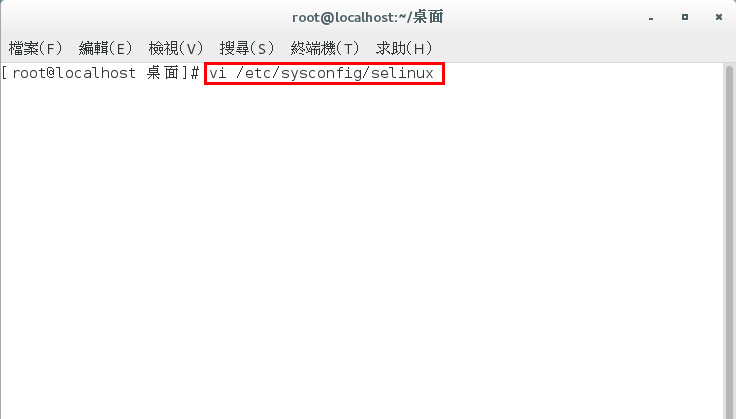
selinux=disabled

reboot

二. 開放「Firewall」
sudo firewall-cmd --add-port=80/tcp --permanent
sudo firewall-cmd --add-port=10051/tcp --permanent
sudo firewall-cmd --add-port=10051/udp --permanent
sudo firewall-cmd --reload

三. 「LAMP」( Apache+PHP+MySQL )
一. 關閉「selinux」
vi /etc/sysconfig/selinux
selinux=disabled
二. 開放「Firewall」
sudo firewall-cmd --add-port=80/tcp --permanent
sudo firewall-cmd --add-port=10051/tcp --permanent
sudo firewall-cmd --add-port=10051/udp --permanent
sudo firewall-cmd --reload
三. 「LAMP」( Apache+PHP+MySQL )
「YUM」安裝 「Apache」
yum install httpd

「YUM」安裝 「MySQL (MariaDB)」
yum install mariadb-server mariadb

設定「啟動」mariadb
systemctl start mariadb
設定 開機自動「啟動」mariadb
systemctl enable mariadb
「YUM」安裝「PHP」
設定「啟動」httpd
systemctl start httpd
設定 開機自動「啟動」httpd
systemctl enable httpd
「YUM」安裝 「MySQL (MariaDB)」
yum install mariadb-server mariadb
設定「啟動」mariadb
systemctl start mariadb
設定 開機自動「啟動」mariadb
systemctl enable mariadb
「YUM」安裝「PHP」
yum install php php-mysql php-gd php-ldap php-odbc php-pear php-xml php-xmlrpc php-mbstring php-snmp php-soap curl curl-devel

四. 安裝「Zabbix 3.2 」 Server
「RPM」安裝「Zabbix 3.2」Repository (版本庫)
rpm -ivh http://repo.zabbix.com/zabbix/3.2/rhel/7/x86_64/zabbix-release-3.2-1.el7.noarch.rpm
rpm -ivh http://repo.zabbix.com/zabbix/3.2/rhel/7/x86_64/zabbix-get-3.2.2-1.el7.x86_64.rpm

「YUM」安裝「Zabbix」套件
PS.
安裝「Zabbix」相關套件: 「zabbix-server-mysql」、「zabbix-web-mysql」、「zabbix-agent」、「zabbix-java-gateway」
yum install zabbix-server-mysql zabbix-web-mysql zabbix-agent zabbix-java-gateway

設定「啟動」zabbix-server
sudo systemctl start zabbix-server
設定 開機自動「啟動」zabbix-server
sudo systemctl enable zabbix-server
五. 編輯「Zabbix」 的 「Apache」 設定檔「/etc/httpd/conf.d/zabbix.conf」
vi /etc/httpd/conf.d/zabbix.conf
php_value date.timezone Asia/Taipei

重新啟動「httpd.service」
service httpd restart
六. 編輯「zabbix_server.conf」修改「資料庫」、「帳號」、「密碼」
PS.
提前 編輯 「zabbix_server.conf」後續建立「MySQL」
vi /etc/zabbix/zabbix_server.conf
DBName=zabbix (預設)
DBUser=zabbix (預設)
DBPassword=123456 (修改)

重新「啟動」zabbix-server
sudo systemctl restart zabbix-server
七. 建立 MySQL 建立 「Zabbix」帳號
mysql -u root -p
create database zabbix character set utf8 collate utf8_bin;
GRANT ALL PRIVILEGES on zabbix.* to 'zabbix'@'localhost' IDENTIFIED BY '123456';
FLUSH PRIVILEGES;
quit;

八. 初始資料表匯入資料庫「Zabbix」
zcat /usr/share/doc/zabbix-server-mysql-3.2.*/create.sql.gz | mysql -u zabbix -p zabbix

九. 重啟「Zabbix」相關「服務」
systemctl restart mariadb
systemctl restart httpd.service
sudo systemctl restart zabbix-server
sudo systemctl restart zabbix-agent
十. 登入「Web UI」http://localhost/zabbix
進行「導引安裝」


輸入「MySQL」建立「Zabbix」密碼

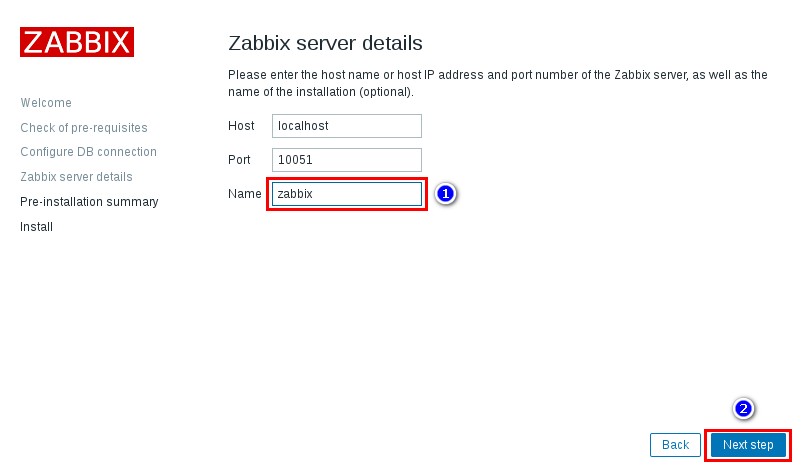

帳號「Admin」、密碼「zabbix」(注意大小寫)


十一. 設定「Zabbix」繁體中文化
編輯「locales.inc.php」
vi /usr/share/zabbix/include/locales.inc.php
編輯「zh_TW」為「true」
'zh_TW' => ['name' => _('Chinese (zh_TW)'), 'display' => true],

修改「Zabbix Web UI」為「zh_TW」


重新啟動「httpd.service」
systemctl restart httpd.service
四. 安裝「Zabbix 3.2 」 Server
「RPM」安裝「Zabbix 3.2」Repository (版本庫)
rpm -ivh http://repo.zabbix.com/zabbix/3.2/rhel/7/x86_64/zabbix-release-3.2-1.el7.noarch.rpm
rpm -ivh http://repo.zabbix.com/zabbix/3.2/rhel/7/x86_64/zabbix-get-3.2.2-1.el7.x86_64.rpm
「YUM」安裝「Zabbix」套件
PS.
安裝「Zabbix」相關套件: 「zabbix-server-mysql」、「zabbix-web-mysql」、「zabbix-agent」、「zabbix-java-gateway」
yum install zabbix-server-mysql zabbix-web-mysql zabbix-agent zabbix-java-gateway
設定「啟動」zabbix-server
sudo systemctl start zabbix-server
設定 開機自動「啟動」zabbix-server
sudo systemctl enable zabbix-server
五. 編輯「Zabbix」 的 「Apache」 設定檔「/etc/httpd/conf.d/zabbix.conf」
vi /etc/httpd/conf.d/zabbix.conf
php_value date.timezone Asia/Taipei
重新啟動「httpd.service」
service httpd restart
六. 編輯「zabbix_server.conf」修改「資料庫」、「帳號」、「密碼」
PS.
提前 編輯 「zabbix_server.conf」後續建立「MySQL」
vi /etc/zabbix/zabbix_server.conf
DBName=zabbix (預設)
DBUser=zabbix (預設)
DBPassword=123456 (修改)
重新「啟動」zabbix-server
sudo systemctl restart zabbix-server
七. 建立 MySQL 建立 「Zabbix」帳號
mysql -u root -p
PS
「root」沒「密碼」直接「Enter」。
create database zabbix character set utf8 collate utf8_bin;
GRANT ALL PRIVILEGES on zabbix.* to 'zabbix'@'localhost' IDENTIFIED BY '123456';
FLUSH PRIVILEGES;
quit;
八. 初始資料表匯入資料庫「Zabbix」
zcat /usr/share/doc/zabbix-server-mysql-3.2.*/create.sql.gz | mysql -u zabbix -p zabbix
九. 重啟「Zabbix」相關「服務」
systemctl restart mariadb
systemctl restart httpd.service
sudo systemctl restart zabbix-server
sudo systemctl restart zabbix-agent
十. 登入「Web UI」http://localhost/zabbix
進行「導引安裝」
輸入「MySQL」建立「Zabbix」密碼
帳號「Admin」、密碼「zabbix」(注意大小寫)
十一. 設定「Zabbix」繁體中文化
編輯「locales.inc.php」
vi /usr/share/zabbix/include/locales.inc.php
編輯「zh_TW」為「true」
'zh_TW' => ['name' => _('Chinese (zh_TW)'), 'display' => true],
修改「Zabbix Web UI」為「zh_TW」
「无限小BUG」-「CentOS 7 下快速搭建 Zabbix 3.0 环境」
